



How to Buy Ethereum on XBO: Step-by-Step Guide
Published: September 18, 2026. Data checked: September 18, 2026, 12:00 UTC.
Buying Ethereum usually means choosing a platform, verifying your identity, selecting a payment method, and placing an order. On XBO, there are three ways to do this: buy directly with a card, convert crypto you already hold into Ethereum, or place an order on the spot trading terminal. Before buying, it helps to understand the platform's verification levels, fees, and security features, so you know exactly what to expect at each step.
To buy Ethereum on XBO, create and verify an account, select Ethereum, choose a supported payment method, enter the amount, review the rate and fees, and confirm the transaction. You can buy with a card, convert another cryptocurrency, or use XBO's spot trading terminal.
This guide walks through all three buying methods, what you need to prepare in advance, and what happens once Ethereum arrives in your wallet.
Table of Contents
- What You Need to Buy Ethereum
- Registering and Verifying Your XBO Account
- Comparison: Three Ways to Buy Ethereum on XBO
- Three Ways to Buy Ethereum on XBO
- What to Do After Buying Ethereum
- Check Fees, Limits, and Order Details Before Confirming
- Payment Methods
- Fees by Currency
- Processing Times
- Important Notes on Regions and Account Currency
- Where to Buy Ethereum Safely
- Do You Need a Wallet to Buy Ethereum?
- Common Mistakes When Buying Ethereum
- Buying Ethereum on XBO
- FAQs About Buying Ethereum

What You Need to Buy Ethereum
Before buying Ethereum on any platform, you will generally need:
- An account on the XBO crypto exchange - the place where you place orders, hold funds, and manage your assets.
- Identity verification. Verification requirements vary by platform, region, payment method, and transaction type.
- A payment method - a bank card, a digital wallet such as Apple Pay or Google Pay, a bank transfer, or crypto you already hold.
- A basic understanding of fees - card purchases, conversions, and spot trading can each have different cost structures.
- A place to store your Ethereum - a wallet within the platform or an external wallet.
Exact requirements may vary depending on your region, the payment method you choose, and the purchase amount.
Registering and Verifying Your XBO Account
Before you can buy Ethereum, you need to register and verify your account. XBO uses a tiered verification system - Occasional, Basic, and Pro - and each level unlocks access to different account functions.
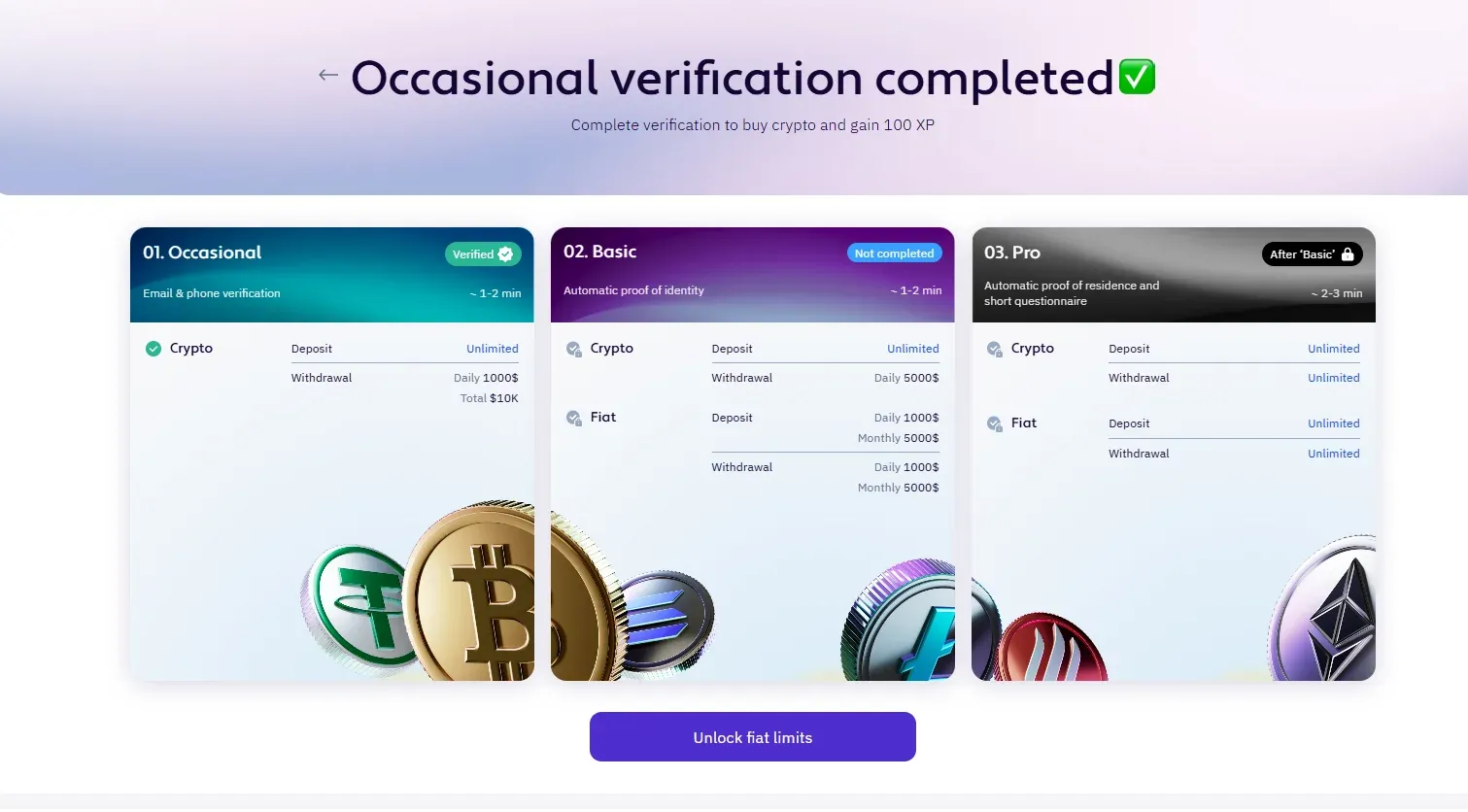
- Occasional - the entry level. Completed by confirming your email address, phone number, first and last name, date of birth.
- Basic - requires providing your residential address, identity document and selfie. This level unlocks higher limits for fiat transactions.
- Pro - requires uploading a residential document and financial source-of-funds information. Pro level grants access to all platform functions, including unrestricted fiat deposits and withdrawals.
Verification is required to meet anti-money laundering (AML) and know-your-customer (KYC) requirements that apply to regulated crypto platforms. On XBO, these checks are handled through identity verification partners and screening systems.
In addition to verification, XBO protects accounts with two-factor authentication (via SMS, on top of your login and password) and requires a one-time SMS code to confirm withdrawals. Asset custody is backed by infrastructure from providers such as Fireblocks and Ledger, with CCSS Level 3, SOC 2, and SSL standards applied across the platform.
Comparison: Three Ways to Buy Ethereum on XBO
| Criteria | Buying with a Card | Convert | Spot Trading Terminal |
|---|---|---|---|
| How it works | Select ETH → “Buy with card” → choose currency → payment method → confirm | Exchange any token you already hold directly into ETH at the quoted conversion rate | Open Trade → Spot → choose pair → order type (market/limit) → amount → Buy |
| Funding source | Bank card, Apple Pay, Google Pay | Crypto already held in your XBO account | Fiat or crypto balance in your account, via the order book |
| Price control | No - executes at the best available price | No - at the quoted conversion rate | Yes - a limit order lets you set the exact price |
| Speed | Fastest, one click | Fast, single step | Depends on order type: market is instant, limit may wait to fill |
| Fee model | Platform fee + payment method fee | Spread / conversion rate | Maker/taker, depends on loyalty tier |
| Best for | Beginners, quick one-time purchases | Users who already hold other crypto and want to reallocate into ETH | Users who want control over their entry price |
Three Ways to Buy Ethereum on XBO
Once your account is set up, there are three main ways to get Ethereum on the platform, depending on how you want to pay and how much control you want over the purchase price.
1. Buy Ethereum Directly With a Card
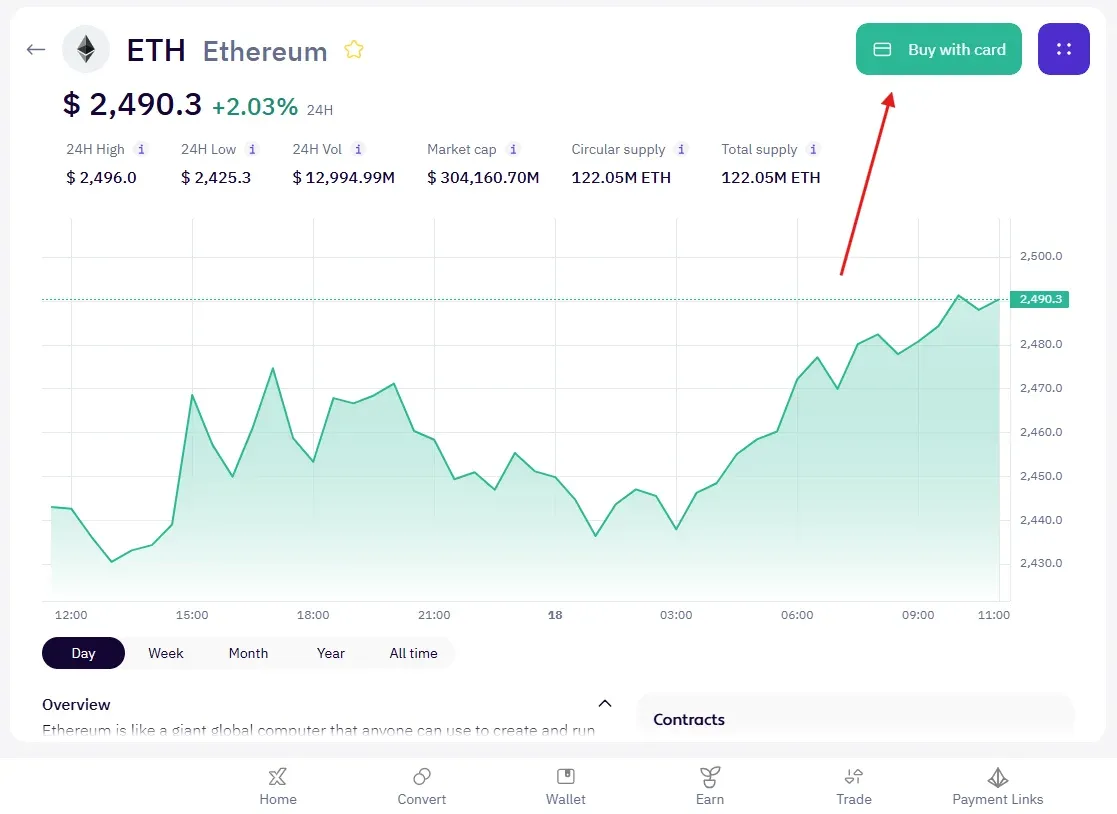
This is the simplest route, especially for beginners.
- Go to the XBO platform and, on the Home tab, select Ethereum from the asset list.
- Click the Buy with card button - located in the top corner of the asset window.
- Choose the currency you want to pay with.
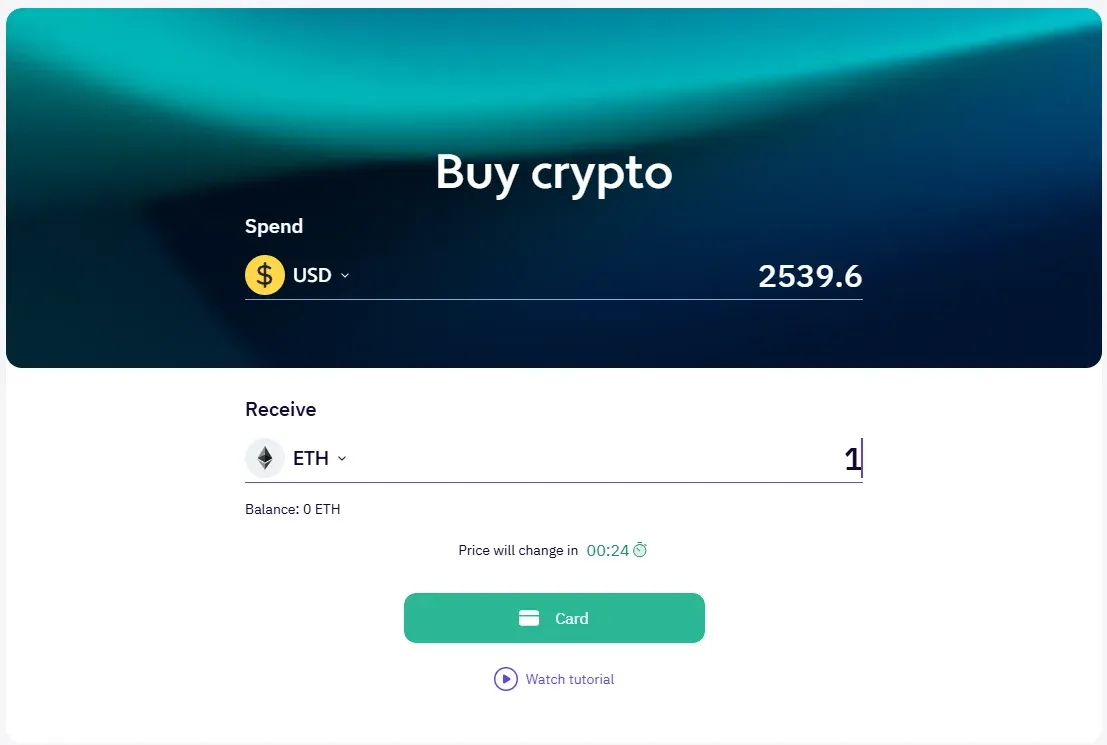
- Confirm the amount and select your payment method - this can be Google Pay, Apple Pay, or your card details directly.
- Review the order details and confirm the purchase.
Buying with a card is built for speed: you choose the amount and payment method, and the trade executes at the best available price. The card purchase process on XBO is also shown in this video walkthrough.
2. Convert Existing Crypto Into Ethereum
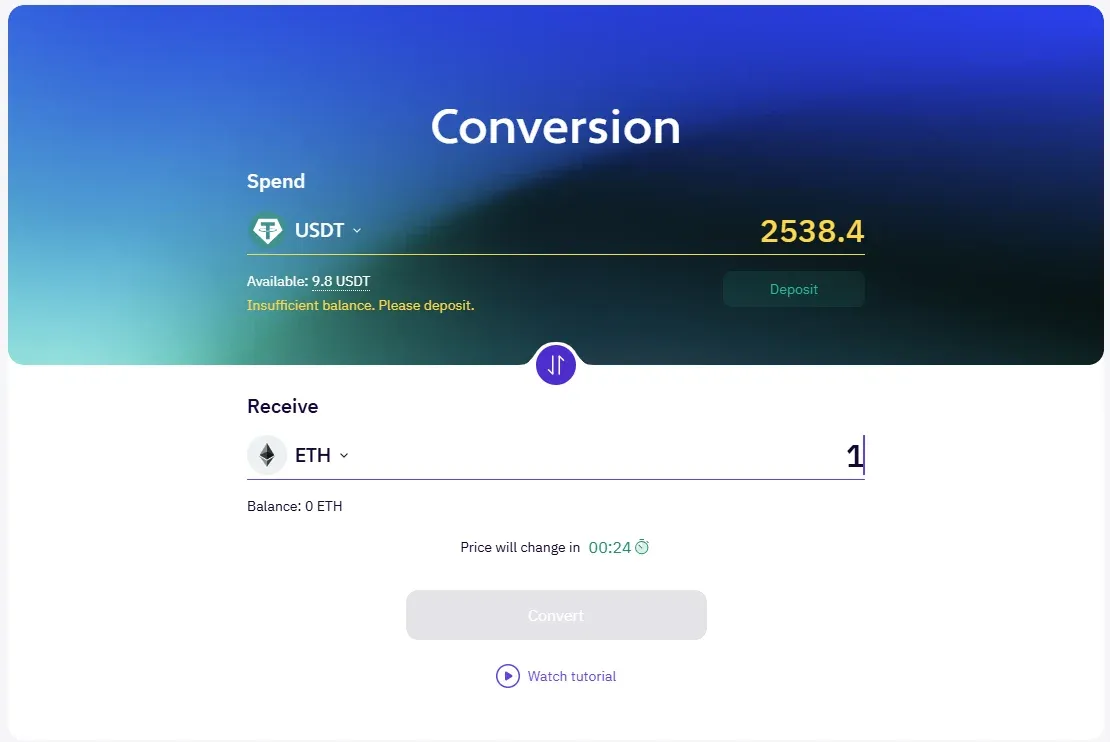
If you already hold other cryptocurrencies on XBO, you don’t need to sell them for fiat or stablecoins first. The Convert tab lets you exchange any supported token you’re holding directly into Ethereum at the quoted conversion rate, in a single step. This is a convenient option if you want to reallocate your tokens into Ethereum without going through a card or bank transaction. Always review the final amount before confirming conversion.
3. Buy Ethereum on the Spot Trading Terminal
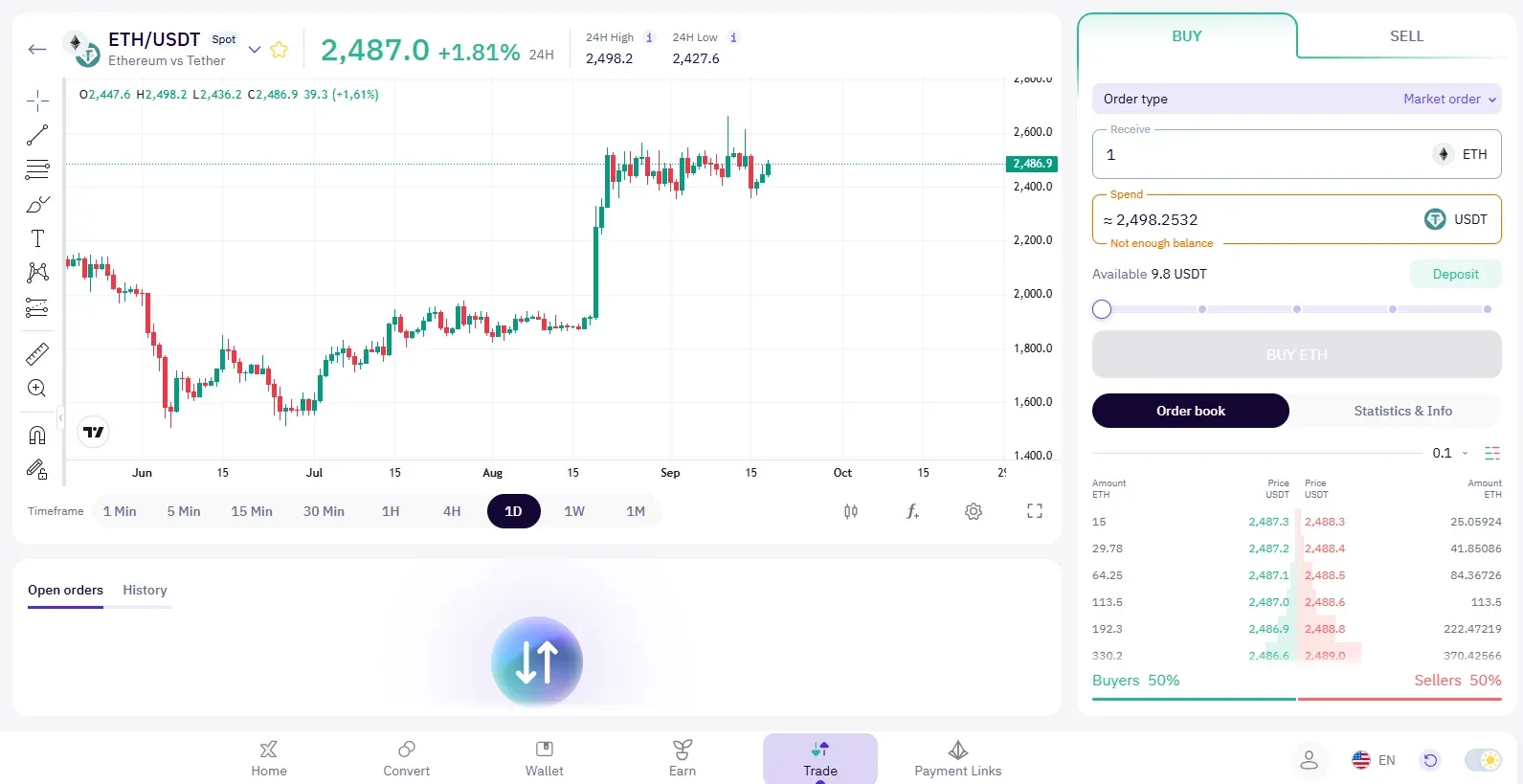
For users who want more control over the purchase price, the Trade section offers a spot trading terminal.
- Open the Trade tab and select Spot.
- Choose the Ethereum trading pair you want to use.
- Choose the order type: a market order executes immediately at the best available price, while a limit order lets you set the exact price you’re willing to pay, if there is enough liquidity in the market to fill your order.
- If using a limit order, enter your price. Then enter either the amount you want to spend or the amount of Ethereum you want to receive.
- Click Buy to place the order.
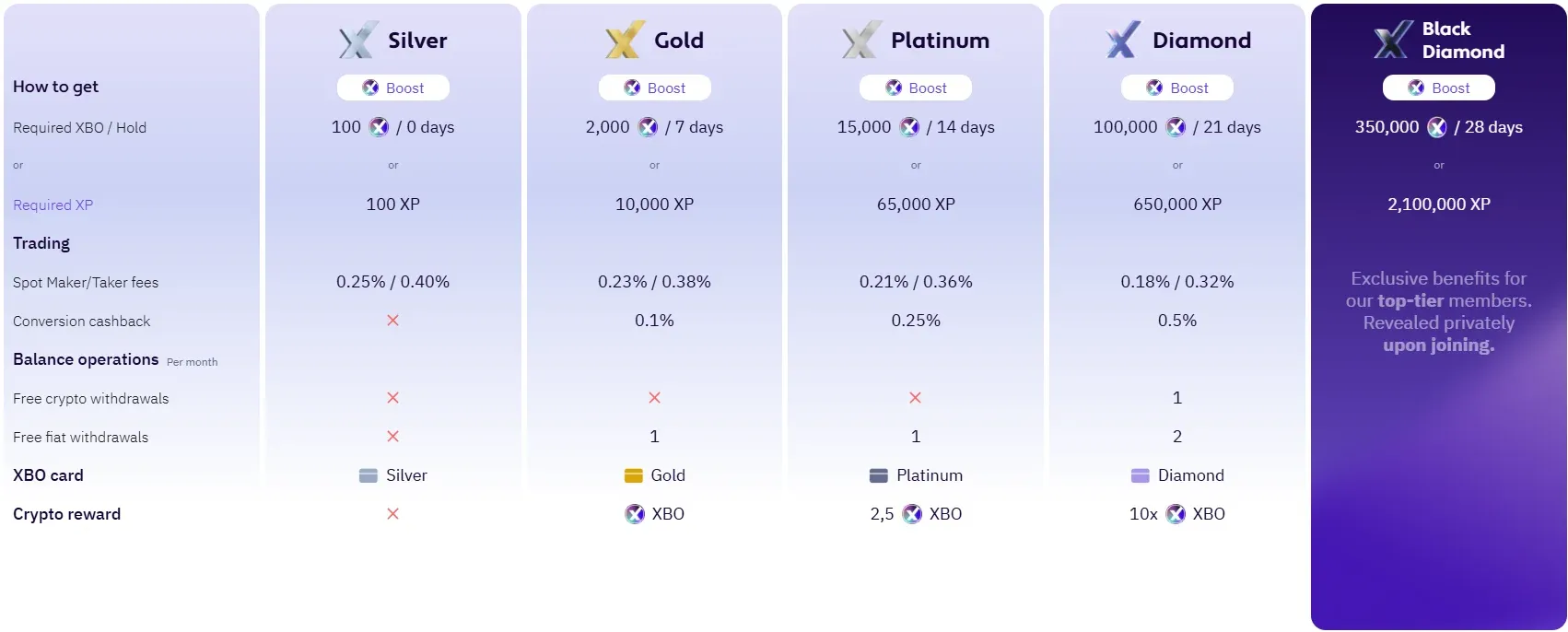
XBO’s loyalty tier program has five tiers - Silver, Gold, Platinum, Diamond, and Black Diamond - unlocked either by holding a minimum amount of XBO tokens or by reaching an XP threshold. Spot trading maker/taker fees decrease as you move up the tiers:
| Tier | Requirement (Hold XBO / XP) | Maker / Taker Fee |
|---|---|---|
| Silver | 100 XBO or 100 XP | 0.25% / 0.40% |
| Gold | 2,000 XBO / 7 days or 10,000 XP | 0.23% / 0.38% |
| Platinum | 15,000 XBO / 14 days or 65,000 XP | 0.21% / 0.36% |
| Diamond | 100,000 XBO / 21 days or 650,000 XP | 0.18% / 0.32% |
| Black Diamond | 350,000 XBO / 28 days or 2,100,000 XP | Custom (revealed upon joining) |
Higher tiers also unlock additional benefits, such as conversion cashback and free monthly withdrawals.
Whichever method you choose, the Ethereum you buy will appear in the Wallet tab as soon as the transaction is complete. After any purchase, it’s worth checking your wallet balance to confirm the trade went through as expected.
Maker/taker fees depend on your loyalty tier and may be updated. Check the current rates for your account on the platform before placing an order.
What to Do After Buying Ethereum
Once your purchase is complete, you have several options for what to do with your Ethereum next:
- Hold. Many users simply keep Ethereum in their account.
- Transfer to a wallet. You can transfer Ethereum to an external wallet for self-custody.
- Sell later. You can sell Ethereum at any time you choose, at the quoted conversion rate.
- Trade on spot markets. The Ethereum you’ve purchased can be used for active spot trading if you want to manage your position more flexibly.
- Use other platform tools. For example, convert your Ethereum into other assets via the Convert tab, or move it between your wallet and trading account as needed.
Check Fees, Limits, and Order Details Before Confirming
Before completing any purchase, it’s worth checking:
- The exchange rate currently on offer
- Platform and payment method fees - card purchases, conversions, and spot trades may be priced differently
- Any spread between the bid and ask price
- Purchase limits, which depend on your verification level
- The final amount of Ethereum you will actually receive after fees
Payment Methods
XBO supports the following payment methods for deposits and withdrawals:
- Credit/debit card
- Bank transfer
- Cryptocurrency (transfers from your own wallet)
- Web3 wallet (MetaMask, Trust Wallet, and others)
Fees by Currency
Deposits
Crypto - 0%
Fiat
| Payment method | Currency and method | Fee |
|---|---|---|
| Credit cards | - | 3.75% + $0.25 |
| Wire transfers | EUR (SEPA, Instant SEPA - EMONI) | Fixed fee of €5 per transaction |
| Wire transfers | USD (SWIFT - OpenPayd Financial Services Malta LTD) | 0.10% per transaction |
| Wire transfer - Dedicated IBAN | EUR (SEPA, Instant SEPA - OpenPayd Financial Services Malta LTD) | Fixed fee of €2 per transaction |
| Wire transfer - Dedicated IBAN | GBP (FPS, SWIFT - OpenPayd Financial Services Malta LTD) | Fixed fee of £2 per transaction |
Fiat currency options are provided at the discretion of the banking institutions and are subject to their risk appetite.
Withdrawals
Crypto - current fees for each crypto asset and minimum withdrawal amounts can be viewed in the Support Hub.
Fiat
| Payment method | Currency and method | Fee |
|---|---|---|
| Credit cards | - | Currently N/A |
| Wire transfers | EUR - SEPA, Instant SEPA, SWIFT | 0.2% - min 12.50 EUR |
| Wire transfers | USD - SWIFT | 0.2% - min 75 USD |
| Wire transfers | GBP - SWIFT, Faster Payments | 0.3% - min 30 GBP |
Deposit fees depend on the payment method, currency, and banking partner, and may differ by region. Fiat options are provided at the discretion of the banking institutions, and terms may be updated, so check the current details on the platform before you deposit.
Processing Times
If the first fiat deposit is split with a card, the withdrawal (crypto and fiat) will be blocked for 72 hours (anti-fraud).
Important Notes on Regions and Account Currency
- Account currency is USD only (cannot currently be changed).
- Geographic restrictions apply: XBO states it does not actively offer services to residents of certain jurisdictions, including but not limited to the United States, United Kingdom, Iran, Russia, occupied territories.
Where to Buy Ethereum Safely
Not all platforms approach security the same way, so it’s worth paying attention to the following:
- Two-factor authentication for account access, beyond a simple password
- Withdrawal confirmation, such as an SMS code, before funds can leave the account
- Cold storage or institutional-grade custody for the majority of client funds
- Transparent verification and AML/KYC compliance processes
- Clear fee disclosure before you confirm a trade
XBO applies these principles across the platform, using infrastructure from established security providers. That said, no platform can eliminate the underlying risk of holding a volatile asset - evaluating security features protects your account, not the market risk of Ethereum itself.
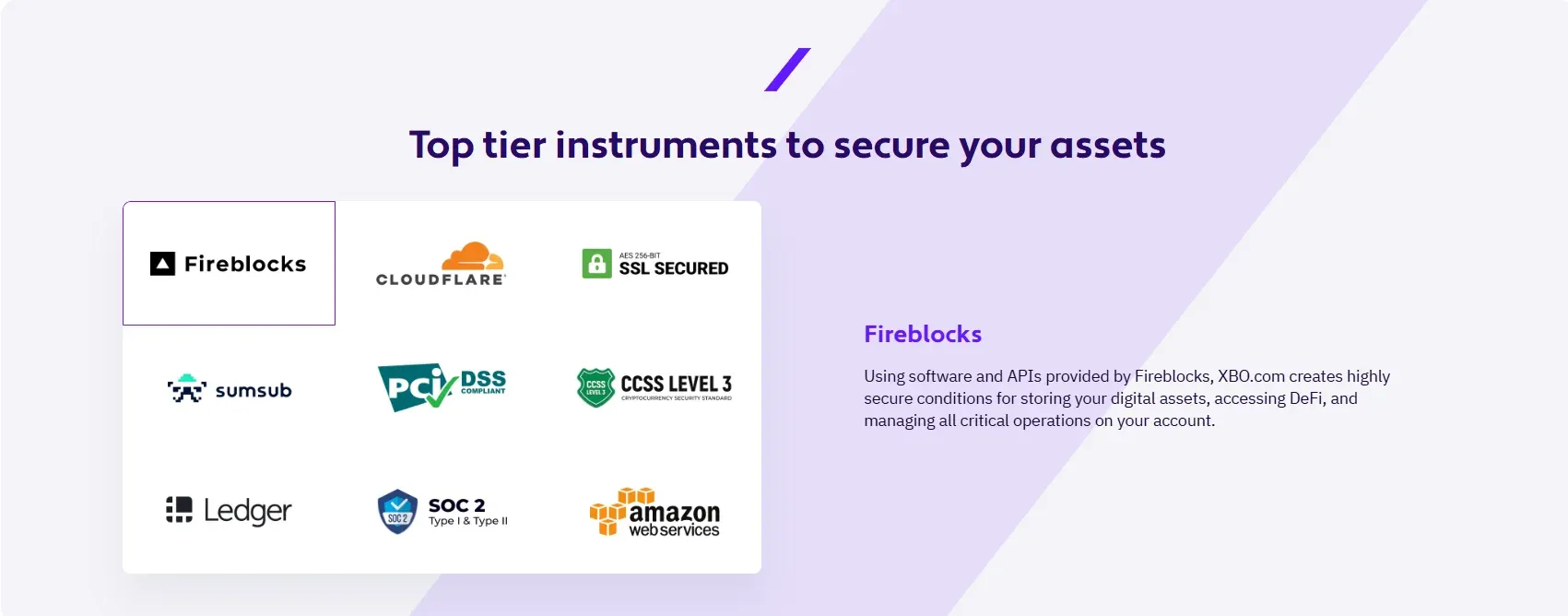
XBO secures user accounts with two-factor authentication, using SMS in addition to login credentials, and requires a one-time SMS verification code for every withdrawal. Asset custody is backed by infrastructure from providers such as Fireblocks and Ledger, while identity verification is handled through Sumsub, and platform infrastructure is protected by Cloudflare. Across the platform, XBO applies CCSS Level 3, SOC 2, PCI DSS, and SSL security standards.
Do You Need a Wallet to Buy Ethereum?
Not necessarily, at least not right away. When you buy Ethereum on XBO, it is held in your XBO wallet by default - there’s nothing separate to set up to complete a purchase.
Common Mistakes When Buying Ethereum
- Not checking fees before confirming. The cost of buying by card, converting, or spot trading can differ.
- Skipping verification early on. Higher verification levels unlock higher limits and full access to fiat transactions.
- Using weak account security. Always enable two-factor authentication.
- Confusing buying with trading. Buying is a one-time transaction at the best available price; trading involves actively managing positions based on price movements and gives you greater order control.
- Ignoring purchase limits. These are tied to your verification level and can affect how much you can buy in a single transaction.
- Buying without understanding volatility. Ethereum’s price can change significantly over short periods of time.
Buying Ethereum on XBO
XBO gives users access to Ethereum and other crypto markets through a single platform that covers buying, converting, and trading. Before buying, it’s worth reviewing the available payment methods, your current verification level, applicable fees, and your account’s security settings.
Depending on your goals, you can:
- Buy Ethereum directly with a card for a quick, one-time purchase
- Convert crypto you already hold into Ethereum without touching fiat
- Use the spot trading terminal if you want to set your own price with a limit order
Move from buying to spot trading later, once you’re comfortable with how orders work
FAQs About Buying Ethereum
What is the easiest way to buy Ethereum on XBO?
Buying directly with a card is usually the easiest option: select Ethereum, click “Buy with card,” choose a payment method, and confirm the order.
Can I buy Ethereum with a credit card?
Yes. XBO supports Visa and Mastercard, as well as Apple Pay and Google Pay, for direct card purchases.
Do I need verification to buy Ethereum?
Yes. At minimum, you need to complete the Occasional verification level (email and phone confirmation, personal information and date of birth) before transacting. Higher levels unlock higher limits.
Do I need another wallet for buying Ethereum?
No. Your Ethereum is automatically held in your XBO wallet after purchase. You can transfer it to an external wallet later if you choose.
What fees should I check before buying Ethereum?
Check the platform fee, the payment method fee, the exchange rate or spread, and - for spot orders - whether you’re paying a maker or taker fee.
What is the difference between buying and trading Ethereum?
Buying is a simplified direct purchase at quoted price while trading involves choosing an order type, setting a price, and managing positions over time.
Can I convert other crypto into Ethereum instead of buying with fiat or stablecoins?
Yes. The Convert tab lets you exchange crypto you already hold on XBO directly into Ethereum at the quoted conversion rate. Before you confirm conversion, always review the final amount.
Sources
Verification: https://www.xbo.com/en/support-verification
Fees: https://www.xbo.com/en/support-buying-and-selling-crypto/what-are-the-trading-fees
Security: https://www.xbo.com/en/security
Loyalty tier: https://www.xbo.com/en/loyalty-program
Spot trading: https://www.xbo.com/en/spot-trading
Buying (Buy Crypto): https://www.xbo.com/en/buy-crypto
Video walkthrough: https://www.xbo.com/platform/assets/buy_crypto_desk_1080x810.DAuE7ehV.mp4
Disclaimer
Ethereum and other crypto assets can be volatile. Users should understand the risks, review fees and limits, and make informed decisions before buying. This article is for general educational purposes and does not constitute financial or investment advice.
Fees, limits, and payment method terms may differ by region, payment method, and account, and may change over time.