



Crypto Payment Methods on XBO: Cards, Bank Transfers, and Other Options
Published: October 16, 2026. Data checked: October 16, 2026, 13:00 UTC.
On XBO, you can pay for crypto in several ways: by bank card (including Apple Pay and Google Pay), by bank transfer (SEPA, Instant SEPA, SWIFT, ACH, Faster Payments), by funding your account with crypto from an external or Web3 wallet, or by exchanging crypto you already hold in your account. The platform also offers additional payment tools: XBO Card, Payment Links, Dedicated IBAN, and, for businesses, XBO Emoney and Mass Payments.
To choose the right payment method, compare fees, minimum amounts, the limits of your verification level, and how you plan to store the assets you buy. Requirements may vary depending on your region, the payment method, and the transaction amount.
This guide covers all available payment methods, fees and limits, verification levels and loyalty tiers, and security features, and explains what Payment Links are and how to use them.
Table of Contents
- Comparison of Crypto Payment Methods on XBO
- What You Need to Get Started
- Verification and Limits
- Payment Methods in Detail
- How Funds You’ve Paid Become Crypto
- Additional XBO Payment Tools
- Payment Methods
- Fees by Currency
- Processing Times
- Important Notes on Regions and Account Currency
- Payment Security
- Common Mistakes When Paying for Crypto
- FAQs About Crypto Payment Methods

Comparison of Crypto Payment Methods on XBO
Below is a quick comparison of the main methods. Details for each are in the sections that follow.
| Method | Purpose | Fee (per XBO data) | Best for |
|---|---|---|---|
| Bank card (Visa, Mastercard, Maestro), including Apple Pay, Google Pay, Neteller, Skrill, and Trustly | Funding your account and buying crypto by card | 3.75% + $0.25 | Beginners and small one-time purchases |
| Bank transfer (SEPA, Instant SEPA, SWIFT, Faster Payments) | Funding your account with fiat | EUR (SEPA, Instant SEPA): €5; USD (SWIFT): 0.10%; GBP: check the current fee on the platform | Larger amounts |
| Dedicated IBAN | A personal IBAN for funding your account | EUR: €2; GBP: £2; individual terms via your manager | Those who need a personal IBAN for regular top-ups |
| Crypto deposit (external wallet or Web3 wallet) | Transferring crypto to your XBO account | 0% | Those who already hold crypto in another wallet |
| Convert (exchange) | Exchanging crypto already in your account | 0% (all costs are included in the quoted price) | Those who already hold other tokens on XBO |
Fees and minimum amounts are displayed in the XBO Help Center and may be updated, so it’s always worth checking the final terms on the confirmation screen before paying.
What You Need to Get Started
Before paying for crypto on any platform, you will need:
- An account on the XBO crypto exchange - the place where you place orders, hold funds, and manage your assets.
- Identity verification. Verification requirements vary by region, payment method, and transaction type.
- A payment method - a bank card, a digital wallet, a bank transfer, or crypto you already hold.
- A basic understanding of fees - cards, bank transfers, conversion, and spot trading can each have different cost structures.
- A place to store the assets you buy - a wallet within the platform or an external wallet.
XBO’s account currency is USD. EUR, GBP, AUD, CAD, CHF, MXN, SEK, and TRY are accepted for buying and selling crypto: if you fund your account in another currency, you will need to convert it into one of the supported currencies when you deposit.
Verification and Limits
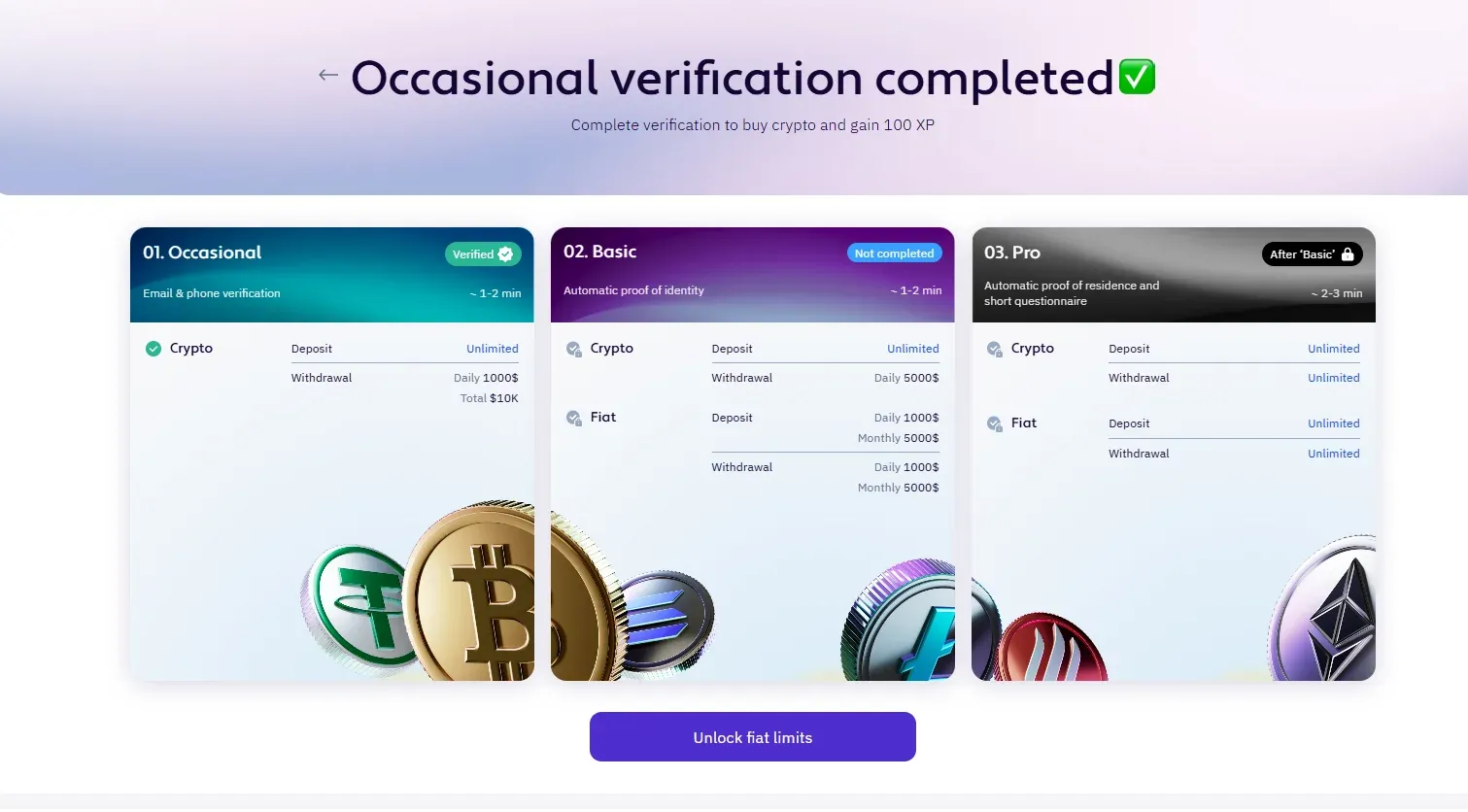
XBO uses three verification levels - Occasional, Basic, and Pro. Verification is needed for security, to confirm your legal capacity, to comply with anti-money laundering (AML) and KYC requirements, and to unlock extended features such as fiat transactions and higher limits. Occasional is enough to start exchanging crypto, while Basic and Pro unlock the full range of platform features.
| Level | What you need to provide | Crypto (limits) | Fiat (limits) |
|---|---|---|---|
| Occasional | Email and phone confirmation, full name and date of birth (18 years or older) | Deposit with no limits; withdrawal up to $1K per day (up to $10K for this level) | - |
| Basic | Residential address, identity document, selfie | Deposit with no limits; withdrawal up to $5,000 per day | Deposit and withdrawal up to $1,000 per day ($5,000 per month) |
| Pro | Proof of residence and a questionnaire (income, source of funds, field of occupation, expected investment amount) | Deposit and withdrawal with no limits | Deposit and withdrawal with no limits |
You can check your verification status in your personal profile: in the mobile app, in the menu next to your name; on the web platform, via the account icon in the bottom-right corner. The possible statuses are Verified, Pending, Declined, and Unverified. The data you provide during verification is protected in line with GDPR and DPA, and XBO’s data controls meet SOC 2 requirements.
Payment Methods in Detail
1. Apple Pay, Google Pay, and E-Wallets
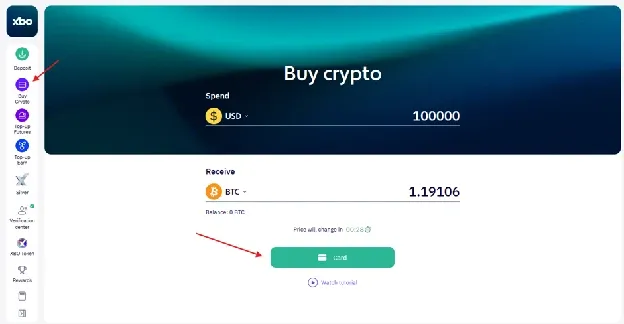
When buying with a card on XBO, you can pay via Google Pay and Apple Pay or with your card details directly. The Buy Crypto page also offers the Neteller, Skrill, and Trustly payment systems. The availability of specific methods depends on your region, the amount, and the asset you choose, so it’s best to check the current list directly on the platform when you pay.
2. Dedicated IBAN
A Dedicated IBAN is a personal IBAN issued in your name or your company’s name. You transfer funds from your own bank directly to this IBAN, and they are credited to your XBO account without intermediary or pooled accounts. USD (SWIFT), EUR (SEPA), and GBP (FPS) are available. XBO states that SEPA and FPS transfers are credited instantly. Fees depend on your risk category and transaction volumes: according to the fee table, it’s €2 for EUR and £2 for GBP, while individual terms are discussed with your XBO account manager, through whom a Dedicated IBAN is requested.
3. Crypto Deposit From an External Wallet
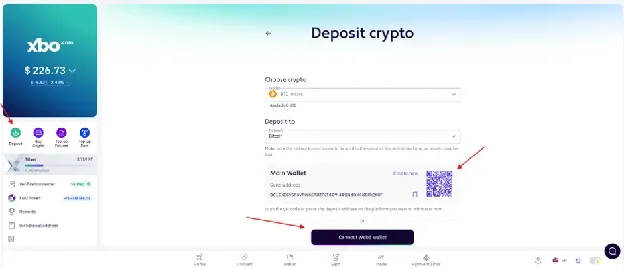
If you already have crypto in another wallet, you can transfer it to your XBO account. The crypto deposit fee is 0%, and the minimum amount is $5 in equivalent.
- Open the Deposit tab in your wallet and select the cryptocurrency you want.
- Select the network you want to use to send or receive funds. The network must be compatible with the currency and match the network selected in your external wallet - otherwise, your funds may be lost.
- Copy the XBO address or scan the QR code and complete the transfer in your external wallet.
4. Connecting a Web3 Wallet (MetaMask, Trust Wallet)
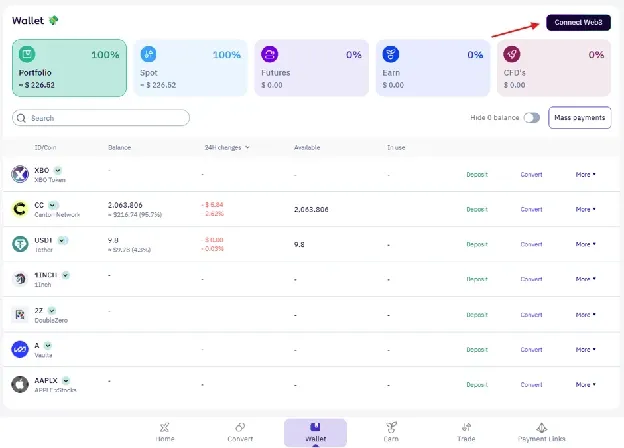
A Web3 wallet lets you interact directly with blockchain services without intermediaries. To connect one, open your XBO wallet, click “Connect Web3 wallet” (or find it in the Deposit section), and follow the on-screen instructions. Once connected, you can fund your account via Deposit via Web3 Wallet or withdraw crypto via Send to Web3 wallet - when withdrawing, the network must match the network of your Web3 wallet.
5. Convert: Exchanging Crypto You Already Hold
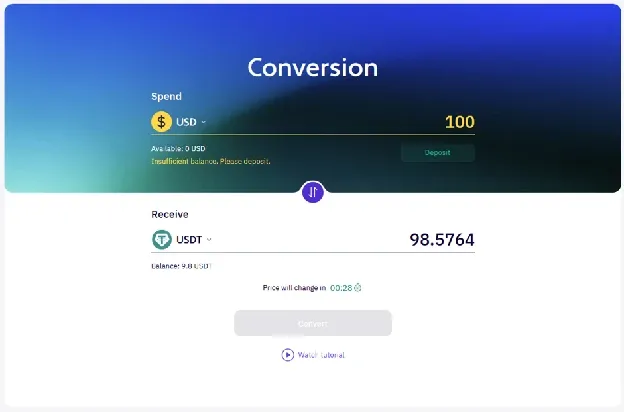
If you already have crypto on XBO, you don’t need to sell it for fiat: the Convert tab lets you exchange one asset for another. Select the coin you’re giving and the coin you want to receive, enter the amount, and click Exchange. XBO doesn’t charge a fee for conversion - all costs are included in the quoted price, and the rate is determined by market supply and demand. Buy and Exchange operations are executed as market orders immediately; a timer is displayed on the screen, within which you need to complete the transaction at the quoted price.
How Funds You’ve Paid Become Crypto
After funding your account, you have three ways to get the asset you want: buy directly with a card on the Buy Crypto page, exchange crypto you already hold via Convert, or place an order on the spot trading terminal. On the spot market, market, limit, and stop orders are available; market orders are executed immediately, while limit and stop orders are executed when the market price reaches the set level. The minimum amount in the Spend field to open an order is 0.0001.
Spot trading fees depend on your loyalty program tier. Tiers are unlocked either by holding a minimum amount of XBO tokens or by accumulating XP - experience points for actions on the platform (completing verification, daily logins, exchanging crypto, spot trading, etc.). The program has five tiers in total: Silver (the starting level), Gold, Platinum, Diamond, and Black Diamond. As your tier grows, fees go down, exchange cashback and crypto rewards increase, the number of free fiat withdrawals per month goes up, and your XBO card is upgraded. The loyalty program is available only to retail clients.
| Tier | Requirement (Hold XBO / XP) | Maker / Taker Fee |
|---|---|---|
| Silver | 100 XBO or 100 XP | 0.25% / 0.40% |
| Gold | 2,000 XBO / 7 days or 10,000 XP | 0.23% / 0.38% |
| Platinum | 15,000 XBO / 14 days or 65,000 XP | 0.21% / 0.36% |
| Diamond | 100,000 XBO / 21 days or 650,000 XP | 0.18% / 0.32% |
| Black Diamond | 350,000 XBO / 28 days or 2,100,000 XP | Custom (revealed upon joining) |
Additional XBO Payment Tools
XBO Card
XBO Card lets you spend crypto like regular money: assets are converted into USD, and the card can be used anywhere Mastercard or Visa is accepted. Both physical and virtual cards are available; a virtual card can be added to Apple Pay or Google Pay.
- Card issuance: a one-time $5 fee; some loyalty tiers include free cards (the number depends on your tier).
- Card top-up: 2% fee; converting crypto to USD is also charged. The minimum top-up is $10, and the maximum is $20,000.
- Cash withdrawals at ATMs are not supported.
- Third-party service providers may charge their own fees.
- If the card issuer detects suspicious activity, the card is frozen. To unfreeze it, contact customer support. To avoid such situations, be sure to review the terms of use.
Payment Links
Payment Links is an XBO feature that lets you send and receive payments via a link. You create a link, share it in any way that’s convenient, and receive (or send) payment in fiat or crypto. The product page also features video tutorials: receiving a payment in crypto, paying in crypto, fast and secure refunds, and auto top-up requests.
Payment Links are designed for various payment scenarios, accept both fiat and crypto, and most transactions carry no fee - check with support for any exceptions.
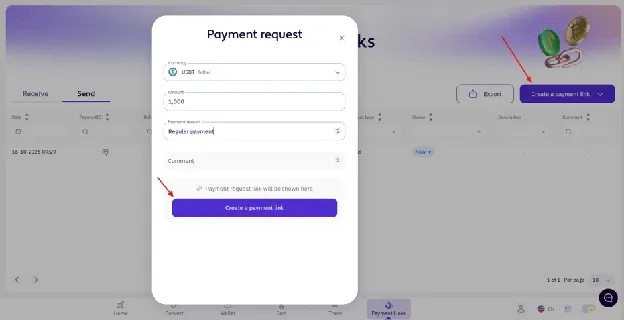
How to use Payment Links:
- Open the Payment Links section on the XBO platform (in the bottom menu) and click “Create your link” on the Payment Links page.
- Enter the payment details and generate the link.
- Send the link by email, in a chat, or in any other convenient way.
- Funds arrive directly in an XBO account - yours or the recipient’s; automatic conversion is performed if needed.
You can export your payment history with the Export button. Only pay links sent by trusted senders: for more on how to recognize fraudulent requests, see the security section below.
For Business: Emoney and Mass Payments
XBO offers additional tools for corporate clients. XBO Emoney is a multi-currency business account provided through the partner Equals Money, with an IBAN, cards (individual and shared), and international payments; opening one requires passing a verification check (KYC). Mass Payments lets you execute a batch of crypto withdrawals from a single CSV file: each upload is treated as one business operation, and all transactions share the same Batch ID for reconciliation and reporting. Mass Payments requires an active corporate account with withdrawal permissions and two-factor authentication enabled, and the fee is calculated at the standard withdrawal rates for each coin and network.
Payment Methods
XBO supports the following payment methods for deposits and withdrawals:
- Credit/debit card
- Bank transfer
- Cryptocurrency (transfers from your own wallet)
- Web3 wallet (MetaMask, Trust Wallet, and others)
Fees by Currency
Deposits
Crypto - 0%
Fiat
| Payment method | Currency and method | Fee |
|---|---|---|
| Credit cards | - | 3.75% + $0.25 |
| Wire transfers | EUR (SEPA, Instant SEPA - EMONI) | Fixed fee of €5 per transaction |
| Wire transfers | USD (SWIFT - OpenPayd Financial Services Malta LTD) | 0.10% per transaction |
| Wire transfer - Dedicated IBAN | EUR (SEPA, Instant SEPA - OpenPayd Financial Services Malta LTD) | Fixed fee of €2 per transaction |
| Wire transfer - Dedicated IBAN | GBP (FPS, SWIFT - OpenPayd Financial Services Malta LTD) | Fixed fee of £2 per transaction |
Fiat currency options are provided at the discretion of the banking institutions and are subject to their risk appetite.
Withdrawals
Crypto - current fees for each crypto asset and minimum withdrawal amounts can be viewed in the Support Hub.
Fiat
| Payment method | Currency and method | Fee |
|---|---|---|
| Credit cards | - | Currently N/A |
| Wire transfers | EUR - SEPA, Instant SEPA, SWIFT | 0.2% - min 12.50 EUR |
| Wire transfers | USD - SWIFT | 0.2% - min 75 USD |
| Wire transfers | GBP - SWIFT, Faster Payments | 0.3% - min 30 GBP |
Deposit fees depend on the payment method, currency, and banking partner, and may differ by region. Fiat options are provided at the discretion of the banking institutions, and terms may be updated, so check the current details on the platform before you deposit.
Processing Times
If the first fiat deposit is split with a card, the withdrawal (crypto and fiat) will be blocked for 72 hours (anti-fraud).
Important Notes on Regions and Account Currency
- Account currency is USD only (cannot currently be changed).
- Geographic restrictions apply: XBO states it does not actively offer services to residents of certain jurisdictions, including but not limited to the United States, United Kingdom, Iran, Russia, occupied territories.
Payment Security
Not all platforms approach security the same way, so when choosing a payment method, it’s worth paying attention to the following:
- Two-factor authentication for account access, beyond a simple password
- Withdrawal confirmation with a one-time code before funds can leave the account
- Cold storage or institutional-grade custody for the majority of client funds
- Transparent verification and AML/KYC compliance processes
- Clear fee disclosure before you confirm a payment
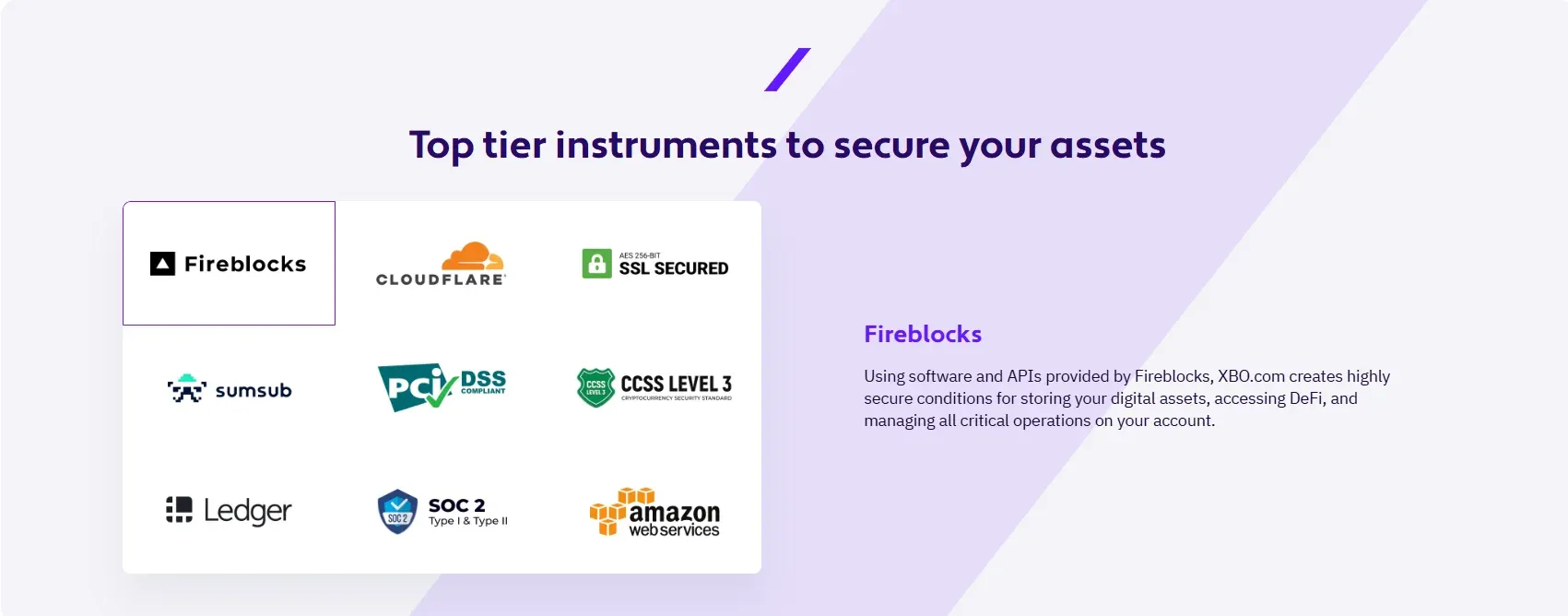
XBO secures user accounts with two-factor authentication - SMS in addition to login credentials - and requires a one-time SMS code to confirm every withdrawal. Asset custody is backed by infrastructure from providers such as Fireblocks and Ledger, identity verification is handled through Sumsub, and platform infrastructure is protected by Cloudflare. Across the platform, XBO applies CCSS Level 3, SOC 2, PCI DSS, and SSL standards.
Payment risks aren’t limited to platform security, so it’s important to follow a few rules:
- Choose a network that is compatible with the receiving wallet every time you transfer crypto - a network error can result in the loss of funds.
- Never share your password or one-time codes with anyone: XBO will never ask you to disclose them, move funds to a “safe account,” or send assets “for verification.”
- Be cautious of unexpected links and payment requests, especially urgent ones or ones that change your usual payment details.
- Beware of promises of guaranteed or unusually high returns and of “act now” pressure.
- Double-check payment details carefully before your first payment or any large payment.
Common Mistakes When Paying for Crypto
- Not checking fees before confirming. Cards, bank transfers, withdrawals, and conversion are priced differently.
- Skipping verification early on. Higher levels unlock higher limits and fiat transactions.
- Ignoring minimum amounts and limits. They differ for cards, bank transfers, and crypto deposits.
- Choosing the wrong network for a crypto transfer. The network must match on both the sender’s and the recipient’s side.
- Overlooking the withdrawal lock after a first card payment. Withdrawals are unavailable for 72 hours.
- Using weak account security. Always enable two-factor authentication.
- Paying links and requests from unverified sources. Make sure you know the sender before paying a link.
FAQs About Crypto Payment Methods
What crypto payment methods are available on XBO?
You can pay by bank card (including via Apple Pay and Google Pay), by bank transfer, by funding your account with crypto from an external or Web3 wallet, or by exchanging crypto you already hold in your account. The availability of individual methods may depend on your region.
Can I buy crypto with a bank card?
Yes. XBO supports Visa, Mastercard, and Maestro, as well as Apple Pay and Google Pay. The card payment fee is 3.75% + $0.25, and the minimum deposit is $10 / €10 / £10.
Do I need verification to pay for crypto?
Yes. To start exchanging crypto, the Occasional verification level is enough (email and phone confirmation, personal information, and date of birth). Basic and Pro unlock fiat transactions and higher limits.
What fees should I check before paying?
Check the payment method fee (for example, 3.75% + $0.25 for cards or the flat fee for a bank transfer), the withdrawal fee, and, for spot orders, the maker or taker fee, which depends on your loyalty tier.
Can I pay for a purchase with crypto I already hold?
Yes. The Convert tab lets you exchange crypto you already hold on XBO for another asset with no fee - all costs are included in the quoted price. You can also fund your account with crypto from an external or Web3 wallet at a 0% fee.
What are Payment Links and what are they for?
Payment Links is an XBO feature for sending and receiving payments via a link. You create a link and send it in any way you like, and the funds arrive in your or the recipient’s XBO account, with automatic conversion if needed. Both fiat and crypto are accepted.
Can I withdraw cash from an ATM with the XBO Card?
No. Cash withdrawals at ATMs are not supported with the XBO Card. You can use the card to pay for purchases anywhere Mastercard or Visa is accepted.
Sources
Deposits & Withdrawals: https://www.xbo.com/en/support-deposits-and-withdrawals
Buy Crypto: https://www.xbo.com/en/buy-crypto
Buying and selling crypto (fees): https://www.xbo.com/en/support-buying-and-selling-crypto/what-are-the-trading-fees
Exchanging crypto: https://www.xbo.com/en/support-exchanging-crypto
Verification: https://www.xbo.com/en/support-verification
Loyalty program: https://www.xbo.com/en/loyalty-program
Security: https://www.xbo.com/en/security
XBO Card: https://www.xbo.com/en/xbo-card
XBO Card (support): https://www.xbo.com/en/support-xbo-card
Dedicated IBAN: https://www.xbo.com/en/support-virtual-iban
Payment Links: https://www.xbo.com/en/payment-links
Create a payment link: https://www.xbo.com/platform/crypto-pay
XBO Emoney: https://www.xbo.com/en/support-xbo-emoney
Mass Payments: https://www.xbo.com/en/corporates/mass-payment
Scam Awareness and Prevention: https://www.xbo.com/en/support-scam-awareness-and-prevention
Spot trading: https://www.xbo.com/en/spot-trading
Support Hub: https://www.xbo.com/en/support
Disclaimer
Crypto assets can be volatile. Users should understand the risks, review fees, limits, and payment method terms, and make informed decisions before buying. Payment method terms may vary by region and change over time. This article is for general educational purposes and does not constitute financial or investment advice.